

Beware of the “We encountered a little problem crediting your account” email that purports to be from PayPal. This is a new and sophisticated payment scam currently circulating on the internet.
Many users may receive this email, claiming that there are funds waiting to be credited to their account, but there’s a minor issue.
The email suggests that you need to expand or upgrade your account to receive the payment and to do so, you must pay a “fee” upfront.
This is an advanced payment scam, as it operates by asking for money in exchange for the promise of receiving even more money, which is inherently suspicious when viewed in a broader context.
Image of the email:
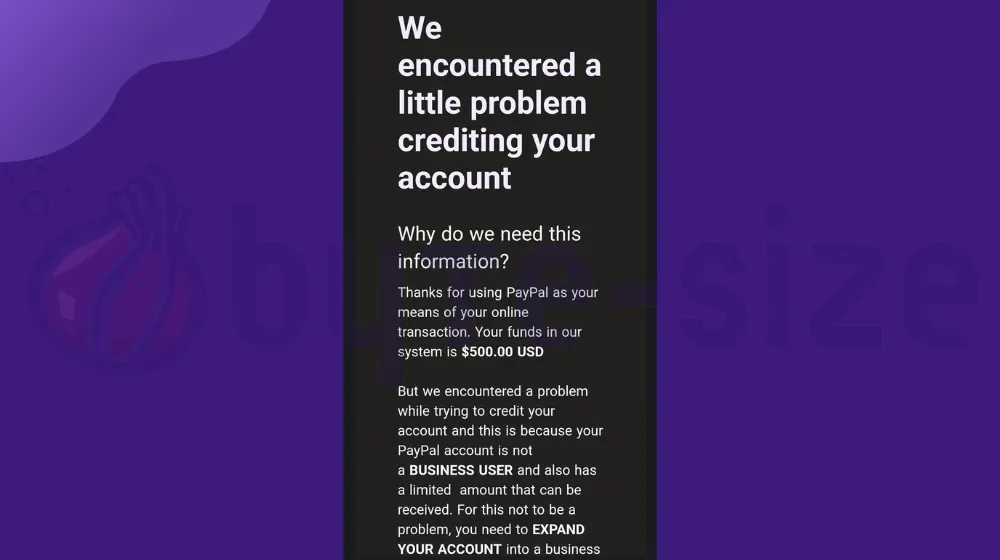
Transcript of the said email in text:
We encountered a little problem crediting your account
Why do we need this information?
Thanks for using PayPal as your means of your online transaction. Your funds in our system is $500.00 USD
But we encountered a problem while trying to credit your account and this is because your PayPal account is not a BUSINESS USER and also has a limited amount that can be received. For this not to be a problem, you need to EXPAND YOUR ACCOUNT into a business account.
NOTE: YOU HAVE TO TAKE THIS URGENT STEP TO EXPAND YOUR ACCOUNT LIMIT.
- You’re to Contact the last sender of your account send you additional to payment of $100.00 USD so that your account limit can be expanded as soon as this is done, we will credit your PayPal account with total sum of $600.00 USD
- An alert has been sent to ****** in regards to the $100.00 USD ADDITIONAL PAYMENT he/she has to send to you and note you’re to refund back the $100.00 USD immediately with no delay, we will secure this transaction with highly priority that either the sender or the payee will not loss funds in the transaction
- You’re to refund the $100.00 USD back after he/she sent it to you.
If you have any questions please do not hesitate to contact us by replying to this email and your request will be answered promptly.
Thanks for using PayPal
The PayPal Teams.
These emails are known as phishing emails. They pretend to be from trustworthy sources like well-known software companies, banks, or popular online services that you may have been using.
They will use official logos and addresses to seem genuine. Sometimes, they’ll appear to be sent by a person you might know, which can be pretty dangerous.
Some of these emails are easy to spot because they have unprofessional layouts and grammar mistakes that are obvious upon a quick look.
These deceptive emails are sent to numerous individuals with the goal of tricking them into engaging with the attachments or links provided. In certain instances, they may even use threats to extort money from the recipients.
Online scammers employ tricks such as urgent messages, fake giveaways, and warnings to prompt quick reactions without verifying the sender’s authenticity.
How did the scammers get your email?
They often obtain it from data breaches on companies or websites where you’ve registered. When a company or platform gets hacked, hackers can access the login information of all users. This data might be sold to scammers who then send out mass emails.
How to identify phishing emails
The “We encountered a little problem crediting your account” phishing email is just one example among many sent to potential victims on a daily basis.
Fraudulent individuals regularly create new fake emails, each mimicking various reputable companies and using appealing subject lines to entice users.
It’s important to distinguish between genuine emails and fake ones to avoid falling victim to data breaches and financial losses caused by these scammers.
Unprofessional email layout design
Scammers often struggle to create convincing email templates. While their designs might resemble legitimate company communications, certain elements can appear unprofessional.
The font might not look good, and the design could be basic HTML or resemble old advertisements from the early 2000s. Nowadays, companies use more modern and stylish layouts.
The image below illustrates such email designs, and these simple errors and unprofessional designs are among the most noticeable warning signs.
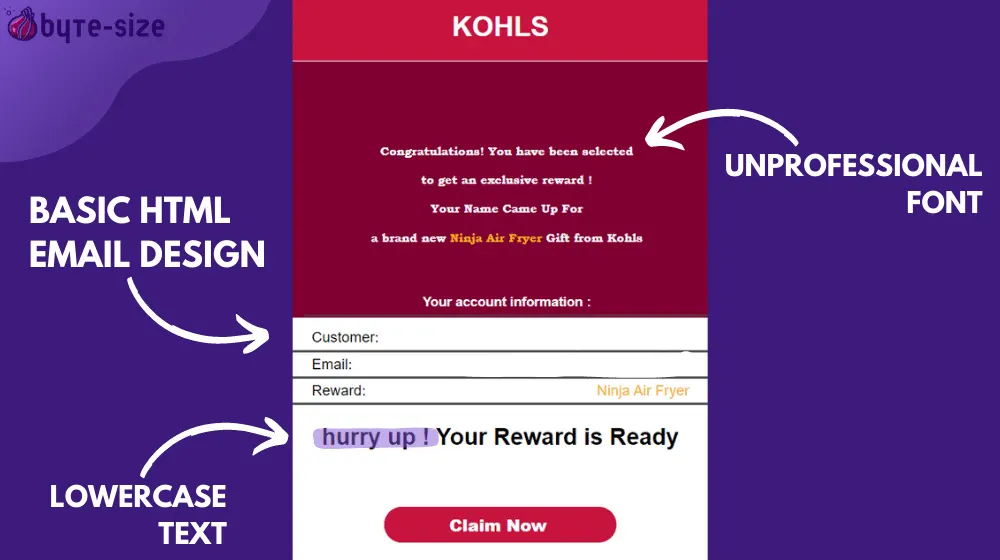
Inexperienced scammers might mishandle images or buttons, resulting in an overall unpolished appearance.
To spot these discrepancies, examine the template’s overall design. Test it by resizing your screen to check for layout issues.
This happens because some emails might appear well-designed on desktop screens, but their layout could become messy when viewed on tablets or mobile devices.
In some instances, emails might lack proper designs altogether, opting for plain text and a button. While some scammers resort to these plain emails, this is uncommon for legitimate companies nowadays.
For example, if you get an email from “Microsoft” stating that your account is at risk, but the email has a basic layout with just a border and a button – and even lacks the logo – be careful. Clicking the button will result in your account getting hacked instead.
Asks for sensitive information
Have you noticed companies highlighting “We never ask for your password” in their emails? This is because reputable companies and banks don’t need your sensitive information – you’ve already gone through the application process.
Scammers are the ones who ask for this info, pretending to be these companies. Legitimate ones won’t ask, as they have no reason to. Scammers aim to get your money, using these tactics.
Here’s a tip: If a promotion asks for too much personal or financial data, be cautious – it’s often a scam.
These scams aim to steal your data. They might create various fake emails with different subject lines and contents, but the result is consistent: they’ll either deceive you into entering your information on a fake site or make you install harmful software on your device.
Their main goal is to take your money or private data, which they misuse for identity theft, fake loans, and other harmful actions using your identity.
Sometimes, they might try to extort money by pretending to know sensitive details about you, info they got from their phishing emails or websites.
Remember, whenever you’re asked for something in order to receive something bigger in return, it’s usually a sign of a scam.
Informal writing style & grammatical errors
One of the biggest signs of a phishing scam is poor grammar which anyone with English knowledge can identify. These scammers might not be as skilled in English as the people they target with their phishing emails.
If you receive emails where basic word usage is mixed up, like confusing “its” and “it’s,” you’re likely dealing with a scam.
Why? Because reputable companies hire experts for their communication. Grammar and wording errors are rare in emails from legitimate companies; they use tools to correct mistakes and train staff to write without errors.
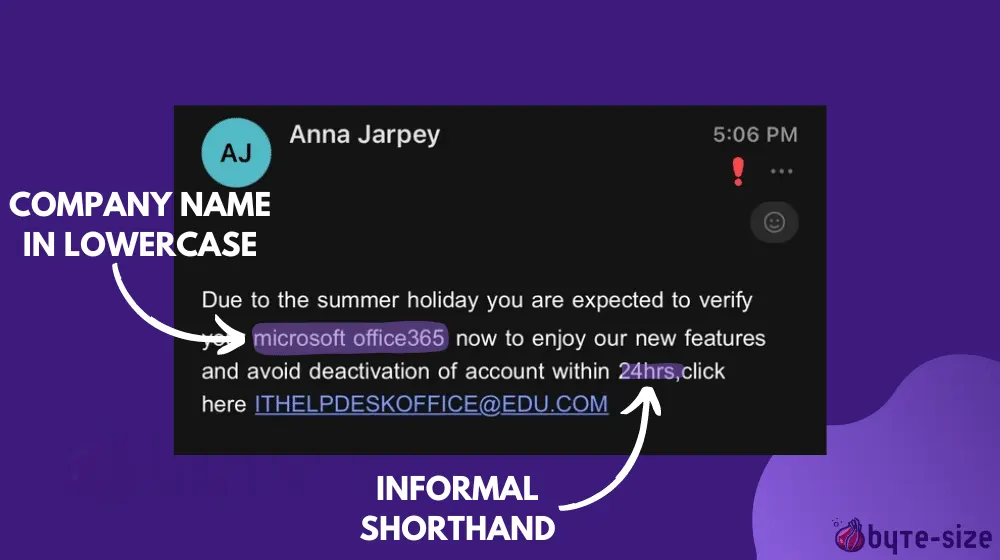
If you receive an email that seems to be written at a grade-school level or worse, it’s not from a legitimate company. It’s likely a scammer trying to steal your money – someone who didn’t pay attention when creating the email.
While some scammers create well-written emails, this only applies to the text itself. When you try to communicate with them, you might notice your language skills are better than theirs.
Such mistakes are never committed by reputable companies; they’re common only in emails crafted by online scammers.
Even if the email design appears professional, if you identify such errors in the text, be cautious and question the email’s authenticity. You can do this by considering other warning signs, which we’ll discuss below.
Displays urgency and makes users act fast
If you receive an email or message that pressures you to decide quickly within a short timeframe, it’s likely a scam.
Common templates for these fake phishing emails include messages claiming you have only 3 days to verify your account or 24 hours to claim a prize from a “supposed” giveaway.
Scammers use tactics that create a sense of urgency, making you think you won’t have another chance. It’s because these scammers want to rush you, hoping you won’t see through their scheme.
These fraudulent individuals want you to act impulsively, preventing you from investigating the email. This could involve checking if the company indeed held a giveaway or verifying if your account has been compromised by trying to log in.
They are aiming for you to fall for their trap quickly, preventing you from considering whether the email is genuinely from a legitimate source.
If you get emails demanding quick actions, don’t do as it says. These rushed requests can lead to bad outcomes. First, verify legitimacy and watch for warning signs before taking any steps.
Sometimes, the giveaways are real, and sometimes, your account might be compromised. The key is to know the source of the message.
Email is sent from a misspelled or public email service provider.
When you come across an email asserting its origin from a specific company, it’s crucial to authenticate its legitimacy by analyzing the sender’s email address.
So, how can you verify this? The process is straightforward. Reputable companies will employ their domain name within the email address, avoiding the use of generic platforms like Yahoo or Gmail.
For instance, an email purportedly from Apple should culminate with “@apple.com” and not “@gmail.com” – a blatant indicator of a potential scam.
Gmail, Yahoo, Mail.ru, and Yandex are a few email services that anyone can use by signing up. They let you send emails to anyone. On the other hand, company domains like Microsoft.com are unique to that company.

For instance, only Microsoft can use emails like [email protected]. Scammers can’t use these domains because they don’t have access to it.
However, it’s important to note that scammers may also use domains that closely resemble the legitimate company’s website address, making it necessary for you to meticulously discern the variance.
An example might involve receiving an unexpected email from Google, with the sender’s address being “[email protected],” an evident misspelling that points towards a fraudulent scheme.
Another point is that scammers might add a few words to make the email sender seem real. For instance, if they want to pretend to be from Citibank, they could buy domains like Citibankgroup.com or Citibankfinance.com. This tricks users into thinking it’s still the same company, which isn’t true.
Offers and promotions that seem too good to be true
Beware of emails promising quick profits and guaranteed rewards in a short time, claims of winning giveaways, or valuable items, especially if they seem too good to be true.
If a certain email claims that it can double your money fast, it’s likely a scheme that will double their own funds instead of yours.
Similarly, offers of winning expensive items often mean they’re the ones benefiting, not you – they’re trying to scam your money.
Scams often involve unbelievably attractive offers, like steep discounts on normally pricey items. For instance, an email advertising a product at 90% off its original price is too good to be true.
Another common scam is receiving sudden windfalls, like a million dollars appearing in your bank account or winning prizes unexpectedly.
A simple online search can verify the authenticity of such claims. Remember, you’re not the only one targeted – these scams are sent to numerous individuals.
How to protect yourself against phishing emails
Spotting a phishing message, like the fake “We encountered a little problem crediting your account” email, is crucial. But understanding how to safeguard yourself matters even more.
If you’ve unintentionally clicked a link or interacted with scammers, what’s your next move? Safeguarding your personal data and finances should be your utmost concern.
It is our mission to protect and inform users of the dangers of the internet. This is why below, we’ve gathered steps and methods that will help you when encountering malicious emails.
Enable two-factor authentication on all accounts
Two-factor authentication (2FA) adds an extra security layer to logins by requiring additional verification steps especially when accessing an account from a new device.
Think of it like entering a bar: first, one bouncer lets you in, and then another bouncer inside asks for more information before granting access.
Similarly, 2FA ensures that even if someone gets your login details, they can’t access your account without an extra verification step.
Using two-factor authentication adds an extra layer of security. The platform usually asks for a verification code sent to your phone. Some platforms even let you use biometrics like facial recognition or fingerprint scans for added safety.
2FA is crucial for all accounts, safeguarding your identity and preventing unauthorized access, regardless of the account’s contents. Your account represents you, and it’s vital to keep strangers out. Only the true owner should have access, proven during login.
Two-factor authentication isn’t just for new device logins; it’s also used in situations requiring confirmation of the account owner’s actions. To enable 2FA, check the Settings section of the platform or website you’re using.
Use an antivirus program for better protection
While built-in systems like Windows Defender and Mac system software can block a lot of malware, they cannot detect all online threats. This is important because phishing emails often carry malicious attachments that pose as documents or files.
When executed, these attachments load malware onto your computer. Malware attacks are concerning as they put both your logged-in data and saved login information at risk, along with important files.
Although Windows Defender is strong, its creator, Microsoft does not solely focus on antivirus and overall cybersecurity. Especially in the case of serious malware attacks triggered by phishing email attachments, dedicated malware-detecting software is essential.
While some argue that Windows Defender combined with common sense is enough to protect against malware, it’s important to recognize that not everyone is tech-savvy. Every user has important accounts requiring protection, regardless of their level of expertise.
A variety of antivirus programs are available, giving you options to choose what suits you best. Some are great at scanning, use fewer hardware resources, or excel at removing malware effectively. Research to find the antivirus that matches your daily computer needs.
Choosing the best antivirus can be intricate due to diverse user needs and ongoing debates. We’re not taking sides here; your choice matters most based on how you use your device.
Think before you click
It’s a common piece of advice, but it’s worth emphasizing: take a moment to think before clicking on links or download buttons that seem too good to be true. Whether you believe it or not, this simple pause can save you from potential harm.
Your instincts play a crucial role in your online safety. They might raise red flags when you encounter certain emails or attachments.
If you have a gut feeling that something’s not right, trust that instinct and give yourself a brief pause. This extra step can be the barrier between falling for a scam and protecting your information.
The consequences of clicking on suspicious links can be severe. Malicious software, often hidden in the background, can infiltrate your system and compromise your security.
What seems like a harmless click can lead to personal data breaches, financial loss, or even the control of your device by hackers.
Report the scam to prevent others from falling victim
The most important step now is reporting the scam. You’ve done well by avoiding phishing scams through your research and finding this information.
Remember, the next person might not be so lucky and could end up being a victim. This could result in significant financial loss and a long recovery process. You can prevent this by reporting the scam.
Your actions can protect others from falling into these traps. Reporting the scam might seem small, but it has a big impact.
When you report the scam, you help authorities track down the people behind these fraudulent emails. We’ve put together a list of where to report online scams, including organizations from different countries dedicated to fighting these frauds.
To make your report more effective, give the authorities complete details of the scam you have encountered. Share everything you know about it with the appropriate authorities and let them act on it.
Bottom Line
Now that you’re informed about the “We encountered a little problem crediting your account” scam and phishing emails in general, remember to steer clear of suspicious messages and report them to authorities.
Doing this can help stop scams in their tracks, and these online fraudsters will be discouraged from making phishing emails. Byte-Size Onion wishes you a safe online experience and a great day ahead.


Leave a Reply